


Android Training Institute in coimbatore mobile app training
| Courses Software Training / Basic Computer Training / Application Programming | Locality Gandhipuram |
Description for "Android Training Institute in coimbatore mobile app training"
R U in Search Of Android Training Institute in coimbatore mobile app training?
Then We Evolet Technologies is the best Android Training Institute in coimbatore. We offer 100% Placement assured software training in Coimbatore.
What is Android?
Before learning all topics of android, it is required to know what is android.
Android is a software package and linux based operating system for mobile devices such as tablet computers and smartphones.
It is developed by Google and later the OHA (Open Handset Alliance). Java language is mainly used to write the android code even though other languages can be used.
The goal of android project is to create a successful real-world product that improves the mobile experience for end users.
There are many code names of android such as Lollipop, Kitkat, Jelly Bean, Ice cream Sandwich, Froyo, Ecliar, Donut etc.
Android is a Linux based operating system it is designed primarily for touch screen mobile devices such as smart phones and tablet computers. The operating system have developed a lot in last 15 years starting from black and white phones to recent smart phones or mini computers. One of the most widely used mobile OS these days is android. The android is software that was founded in Palo Alto of California in 2003.
The android is a powerful operating system and it supports large number of applications in Smartphones. These applications are more comfortable and advanced for the users. The hardware that supports android software is based on ARM architecture platform. The android is an open source operating system means that it s free and any one can use it. The android has got millions of apps available that can help you managing your life one or other way and it is available low cost in market at that reasons android is very popular.
The android development supports with the full java programming language. Even other packages that are API and JSE are not supported. The first version 1.0 of android development kit (SDK) was released in 2008 and latest updated version is jelly bean.
Android Architecture:
The android is a operating system and is a stack of software components which is divided into five sections and four main layers that is
Linux kernel
Libraries
Android runtime
Application frame work:
Features of Android
After learning what is android, let's see the features of android. The important features of android are given below:
1) It is open-source.
2) Anyone can customize the Android Platform.
3) There are a lot of mobile applications that can be chosen by the consumer.
4) It provides many interesting features like weather details, opening screen, live RSS (Really Simple Syndication) feeds etc.
It provides support for messaging services(SMS and MMS), web browser, storage (SQLite), connectivity (GSM, CDMA, Blue Tooth, Wi-Fi etc.), media, handset layout etc.
ategories of Android applications
There are many android applications in the market. The top categories are:
Entertainment
Tools
Communication
Productivity
Persona
lization
Music and Audio
Social
Media and Video
Travel and Local etc.
Android Versions, Codename and API
Let's see the android versions, codenames and API Level provided by Google.
Version Code name API Level
1.5 Cupcake 3
1.6 Donut 4
2.1 Eclair 7
2.2 Froyo 8
2.3 Gingerbread 9 and 10
3.1 and 3.3 Honeycomb 12 and 13
4.0 Ice Cream Sandwitch 15
4.1, 4.2 and 4.3 Jelly Bean 16, 17 and 18
4.4 KitKat 19
5.0 Lollipop 21
6.0 Marshmallow 23
7.0 Nougat 24-25
8.0 Oreo 26-27
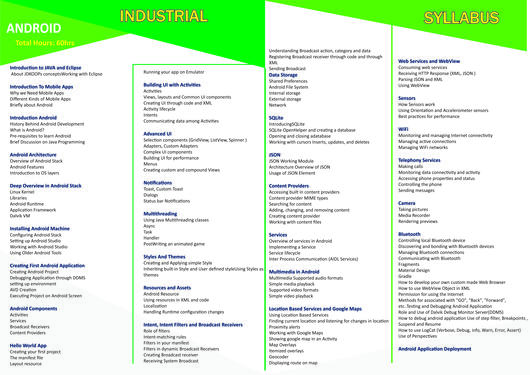
Our Syllabus :
Android Training
Android Tutorial
Android IntroductionWhat is AndroidHistory and VersionAndroid ArchitectureCore Building BlocksAndroid EmulatorInstall AndroidSetup EclipseHello Android exampleInternal DetailsDalvik VMAndroidManifest.xmlR.javaHide Title BarScreen Orientation
Android Widgets
UI WidgetsWorking with ButtonToastCustom ToastToggleButtonCheckBoxCustom CheckBoxRadioButtonDynamic RadioButtonCustom RadioButtonAlertDialogSpinnerAutoCompleteTextViewListViewCus
tom ListViewRatingBarWebViewSeekBarDatePickerTimePickerAnalog and DigitalProgressBarVertical ScrollViewHorizontal ScrollViewImageSwitcherImageSliderViewStubTabLayoutTabLayout with FrameLayoutSearchViewSearchView on ToolbarEditText with TextWatcher
Activity and Intents
Activity LifeCycleImplicit IntentExplicit IntentStartActivityForResultShare App Data
Android Fragments
Android Fragments
Android Menu
Option MenuContext MenuPopup Menu
Android Service
Android Service
Android AlarmManager
Android AlarmManager
Android Storage
Android PreferencesInternal StorageExternal Storage open link
Android SQLite
SQLite TutorialSQLite Spinner
XML and JSON
XML Parsing SAXXML Parsing DOMXMLPullParserJSON Parsing
Android Multimedia
MediaPlayer: AudioVideoView: VideoRecording Media
Android Speech
TextToSpeech1TextToSpeech2
Android Telephony
TelephonyManagerGet Call StateGet Call State 2Simple Caller TalkerPhone CallSend SMSSend Email
Android Device
Bluetooth TutorialList Paired DevicesWIFI
Camera Tutorial
Camera Tutorial
Sensor Tutorial
Sensor Tutorial
Android Graphics
Android Graphics
Android Animation
Android Animation
Android Web Service
Android Web Service
Google Map
Android Google MapCurrent LocationSearch Location
Adding Ads
Android Google Admob1) Banner Ads2) Interstitial Ads
Android Interview
Interview Questions
Android Quiz
Android QuizOkay
ELIGIBILITY:
Internal Students
Students from any Degree
Should have their own LAPTOP
TAKE AWAY
Technology Training along with Project guidance
Live Project experience in the selected technology
Course Completion Certificate.
Internship Experience letter
15 hours soft skills free training
Can attend all campus drive / Job Fairs etc,.
20 hours technologies brush up.
30 hours project guidance.
Please check our website : TAKE AWAY
Technology Training along with Project guidance
Live Project experience in the selected technology
Course Completion Certificate.
Internship Experience letter
15 hours soft skills free training
Can attend all campus drive / Job Fairs etc,.
20 hours technologies brush up.
30 hours project guidance.
Please Check our Website : http://courses.etcoe.in/
Latest Activities : http://etcoe.in/news-blog/


